Are you a busy gamer juggling work family and limited free time but still crave some digital adventure The Intel N100 processor might be on your radar as a budget-friendly option for light gaming machines or mini PCs. This comprehensive guide dives deep into the capabilities and limitations of the Intel N100 for gaming in 2026. We cut through the hype to provide honest insights for casual players seeking performance value and hassle-free setups. Discover which games run smoothly how to optimize settings for the best experience and if this CPU truly offers enough bang for your buck without breaking the bank. This article will help you decide if the N100 is your gaming companion for relaxation and social play.
Is the Intel N100 Truly Capable of Gaming in 2026
The Intel N100 is designed primarily for efficiency and everyday computing tasks not high-performance gaming. In 2026 it remains capable for very light casual indie and older titles. Think social games like Among Us cozy games such as Stardew Valley or classic strategy games. It struggles with modern AAA games or demanding esports titles due to its limited integrated graphics and low core count. For busy adults seeking quick fun without demanding graphics the N100 can offer a surprising amount of enjoyment within its specific niche.
What Types of Games Can the Intel N100 Handle Smoothly
The Intel N100 shines with games that have lower graphical demands. This includes many popular indie games like Minecraft Terraria and Celeste. Older esports titles at minimum settings like League of Legends or CS GO might be playable at 720p with significant compromises. Browser-based games and many free-to-play social experiences are also well within its capabilities. Retro emulation is another strong suit allowing you to revisit classics without a powerful machine. It's perfect for unwinding after a long day with something less intense.
How Does the N100 Compare to Entry-Level Gaming CPUs on a Budget
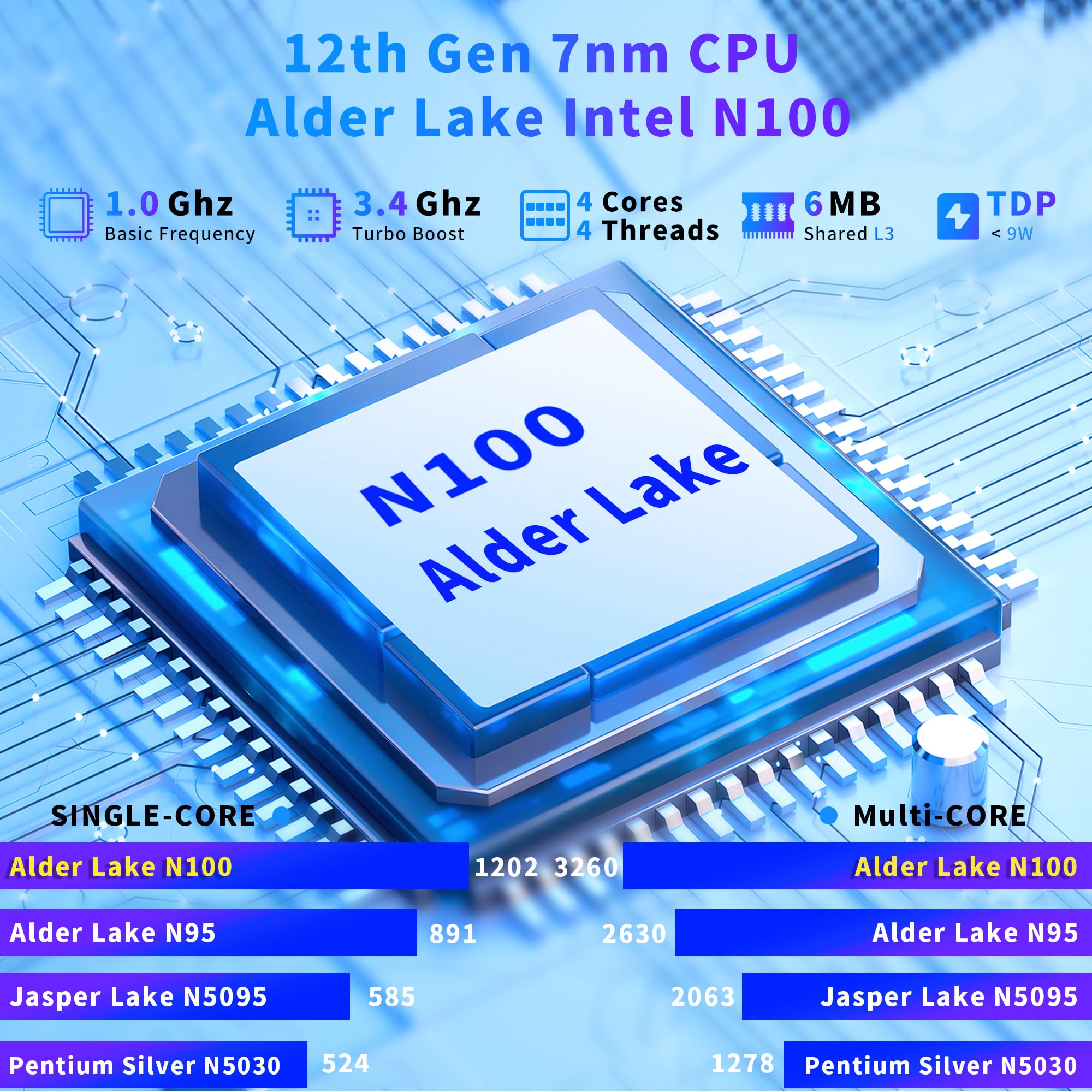
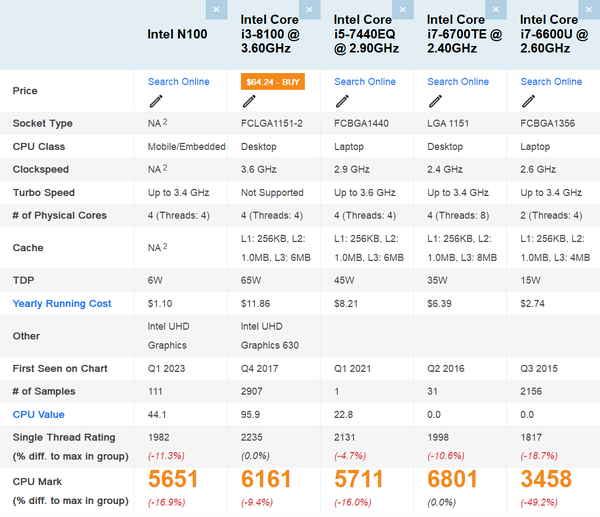
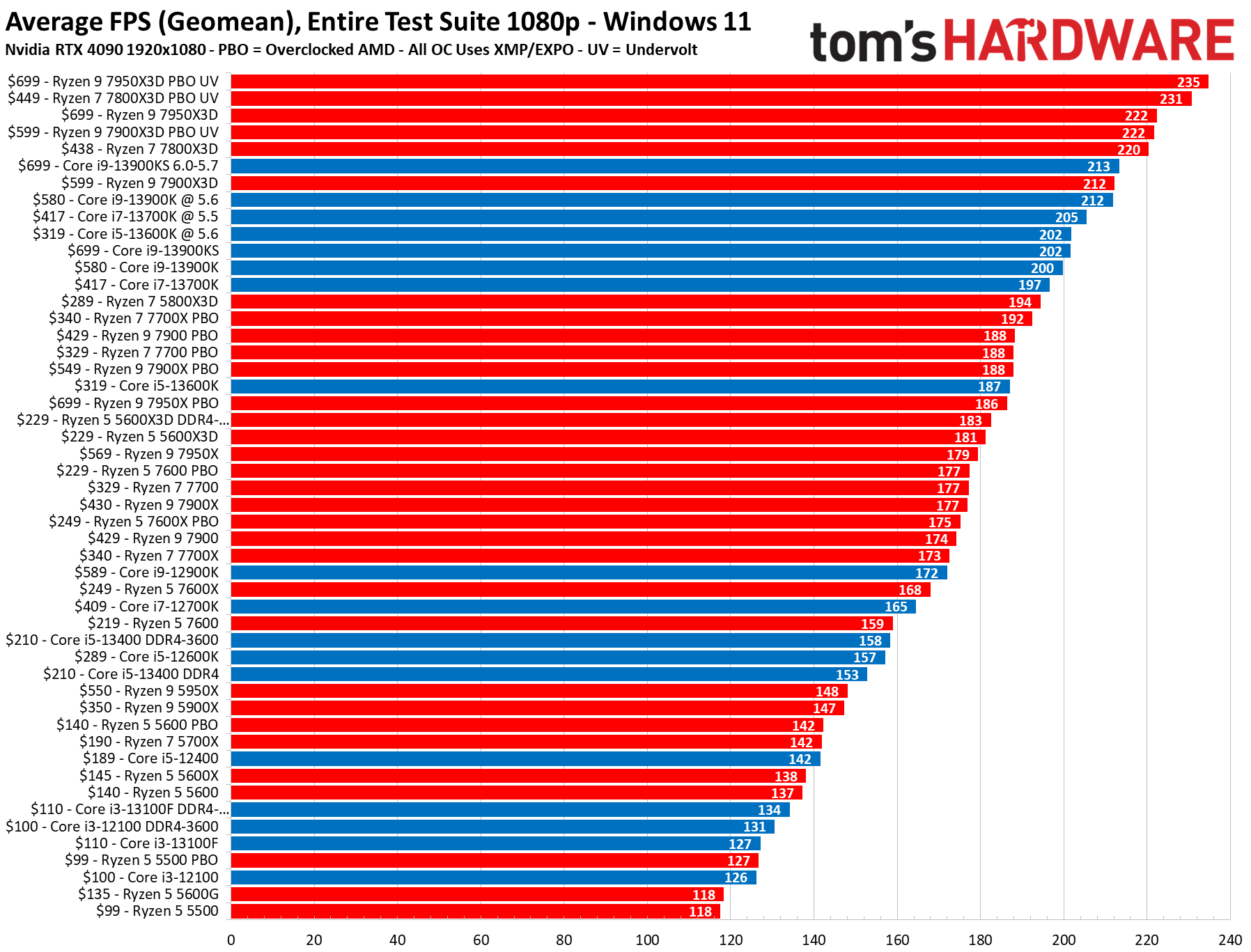
Compared to dedicated entry-level gaming CPUs like a Ryzen 3 or even older Intel i3 models the N100 falls short in raw gaming performance. Those CPUs often feature stronger integrated graphics (like AMD's RDNA 2 iGPUs) or more powerful CPU cores that benefit modern game engines. The N100's primary advantage is its incredibly low power consumption and cost making it ideal for ultra-compact fanless systems. For budget gamers prioritizing efficiency and a tiny footprint over raw power the N100 offers a different value proposition but it's not a direct competitor for traditional gaming builds.
Can the Intel N100 Handle Cloud Gaming Services Effectively
Yes the Intel N100 is surprisingly good for cloud gaming services like GeForce NOW Xbox Cloud Gaming or Amazon Luna. Since the heavy lifting is done on remote servers the N100 only needs to decode the video stream and handle input. Its excellent power efficiency and low cost make it a perfect thin client for streaming high-end games. As long as you have a stable high-speed internet connection the N100 can provide a fantastic cloud gaming experience allowing you to access AAA titles without needing powerful local hardware. This is a significant win for budget-conscious gamers.
What Are the Best Optimizations for Gaming on an Intel N100 System
To get the most out of your Intel N100 for gaming focus on these optimizations. First ensure your system has at least 8GB of RAM preferably in dual-channel configuration if supported. Set all in-game graphics settings to the absolute lowest. Reduce resolution often to 720p or even lower if available. Disable V-Sync unless screen tearing is severe. Update your graphics drivers to the latest available version from Intel. Close all unnecessary background applications to free up resources. Overclocking is not an option for the N100 so software tweaks are key.
Is the Intel N100 a Good Choice for a Secondary or Travel Gaming PC
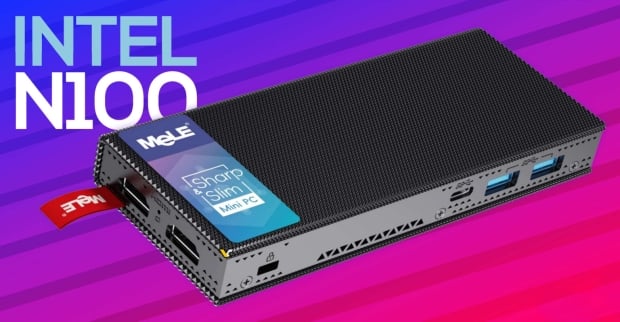
For a secondary gaming PC or a travel-friendly setup the Intel N100 can be an excellent choice. Its tiny form factor low power draw and minimal heat generation make it perfect for mini PCs or laptops designed for portability. You won't be playing Cyberpunk 2077 on a plane but for casual games social gatherings or accessing cloud gaming on the go it's highly competent. Many gamers use N100 systems as dedicated media centers that can also dabble in light gaming offering great versatility without significant investment or bulk.
What Realistic Expectations Should I Have for Intel N100 Gaming
Set realistic expectations. The Intel N100 is not a gaming powerhouse. Expect to play older titles indie games and less graphically intensive social games at lower resolutions and settings. Do not expect smooth 1080p 60fps on modern AAA games or competitive esports titles. It's a processor built for value efficiency and basic computing. If you approach it as a device for relaxation light entertainment and cloud gaming it will exceed expectations. If you expect a budget alternative to a dedicated gaming rig you will be disappointed. It's about smart gaming choices for your specific needs.
Ever feel like gaming is a luxury only for those with unlimited time and top-tier rigs Juggling work family and adulting often leaves little room for elaborate gaming setups or marathon sessions. Yet the desire to unwind connect with friends or simply escape into a virtual world remains strong for many of us. You're not alone. Recent US gaming stats reveal that approximately 87 percent of gamers regularly play, averaging over 10 hours per week, proving that gaming is a fundamental part of modern life for busy adults. Mobile gaming dominates but PC and console cross-play alongside social gaming trends are booming. This brings us to a crucial question for the budget and efficiency-conscious gamer in 2026: is Intel N100 good for gaming
The Intel N100 processor, a common sight in mini PCs and budget laptops, promises efficiency and affordability. But can it deliver a satisfying gaming experience without breaking your bank or demanding a complex setup We’re here to cut through the marketing noise and give you the real talk. This guide is crafted for gamers like you who value relaxation, fun, skill-building, social play, and smart spending. We’ll explore the N100's gaming capabilities, what it excels at, where it falls short, and how to optimize your experience. Say goodbye to performance problems and hardware upgrade anxieties. Let's find out if the N100 can be your secret weapon for balancing gaming with life.
Is the Intel N100 Truly Capable of Gaming in 2026
The Intel N100 is designed primarily for efficiency and everyday computing tasks, not high-performance gaming. In 2026, it remains capable for very light casual, indie, and older titles. Think social games like Among Us, cozy games such as Stardew Valley, or classic strategy games. It struggles with modern AAA games or demanding esports titles due to its limited integrated graphics and low core count. For busy adults seeking quick fun without demanding graphics, the N100 can offer a surprising amount of enjoyment within its specific niche. It's about setting realistic expectations and choosing games wisely.
What Types of Games Can the Intel N100 Handle Smoothly
The Intel N100 shines with games that have lower graphical demands. This includes many popular indie games like Minecraft, Terraria, and Celeste. Older esports titles at minimum settings, like League of Legends or CS: GO (pre-CS2), might be playable at 720p with significant compromises. Browser-based games and many free-to-play social experiences are also well within its capabilities. Retro emulation is another strong suit, allowing you to revisit classics without a powerful machine. It's perfect for unwinding after a long day with something less intense, offering a great way to socialize in games or simply de-stress.
How Does the N100 Compare to Entry-Level Gaming CPUs on a Budget
Compared to dedicated entry-level gaming CPUs like a Ryzen 3 or even older Intel i3 models, the N100 falls short in raw gaming performance. Those CPUs often feature stronger integrated graphics (like AMD's RDNA 2 iGPUs in newer Ryzen chips) or more powerful CPU cores that benefit modern game engines. The N100's primary advantage is its incredibly low power consumption and cost, making it ideal for ultra-compact, often fanless systems. For budget gamers prioritizing efficiency and a tiny footprint over raw power, the N100 offers a different value proposition, but it's not a direct competitor for traditional gaming builds. It's about value for money in a different segment.
Can the Intel N100 Handle Cloud Gaming Services Effectively
Yes, the Intel N100 is surprisingly good for cloud gaming services like GeForce NOW, Xbox Cloud Gaming, or Amazon Luna. Since the heavy lifting is done on remote servers, the N100 only needs to decode the video stream and handle input. Its excellent power efficiency and low cost make it a perfect thin client for streaming high-end games. As long as you have a stable, high-speed internet connection, the N100 can provide a fantastic cloud gaming experience, allowing you to access AAA titles without needing powerful local hardware. This is a significant win for budget-conscious gamers looking to stay current with major titles without the upgrade headache.
What Are the Best Optimizations for Gaming on an Intel N100 System
To get the most out of your Intel N100 for gaming, focus on these optimizations. First, ensure your system has at least 8GB of RAM, preferably in dual-channel configuration if supported, as integrated graphics heavily rely on system memory. Set all in-game graphics settings to the absolute lowest – shadows, textures, anti-aliasing should all be minimized. Reduce resolution, often to 720p or even lower if available, for a smoother frame rate. Disable V-Sync unless screen tearing is severely distracting. Update your graphics drivers to the latest available version from Intel's website. Crucially, close all unnecessary background applications, including browser tabs and Discord, to free up resources. Overclocking is not an option for the N100, so software tweaks are your best friends. These steps can significantly improve performance for those short gaming bursts.
Is the Intel N100 a Good Choice for a Secondary or Travel Gaming PC
For a secondary gaming PC or a travel-friendly setup, the Intel N100 can be an excellent choice. Its tiny form factor, low power draw, and minimal heat generation make it perfect for mini PCs or laptops designed for portability. You won't be playing graphically intensive AAA games on a plane, but for casual games, social gatherings, or accessing cloud gaming on the go, it's highly competent. Many gamers use N100 systems as dedicated media centers that can also dabble in light gaming, offering great versatility without significant investment or bulk. It’s ideal for setting up a quick gaming station in another room or taking to a friend's house for some cooperative fun.
What Realistic Expectations Should I Have for Intel N100 Gaming
Set realistic expectations. The Intel N100 is not a gaming powerhouse. Expect to play older titles, indie games, and less graphically intensive social games at lower resolutions and settings. Do not expect smooth 1080p 60fps on modern AAA games or competitive esports titles like Valorant or Warzone. It's a processor built for value, efficiency, and basic computing. If you approach it as a device for relaxation, light entertainment, and cloud gaming, it will exceed expectations. If you expect a budget alternative to a dedicated gaming rig, you will be disappointed. It's about smart gaming choices for your specific needs, focusing on the joy of playing rather than chasing ultra-settings.
Can I Play Popular Social and Cozy Games on the Intel N100
Absolutely, this is where the Intel N100 truly shines for many modern gamers. Titles like Palworld, Lethal Company, and other trending social/cozy games that aren't hyper-realistic often run surprisingly well. Games focused on community, crafting, or exploration rather than cutting-edge graphics are perfect for the N100. Think Animal Crossing-style games on PC, or cooperative titles where the gameplay loop is more important than visual fidelity. This aligns perfectly with the current trends in gaming where social interaction and relaxed experiences are highly valued, especially for adults looking to unwind and connect after a busy day.
What About Emulation and Retro Gaming on an N100 System
For enthusiasts of retro gaming and emulation, the Intel N100 is a fantastic budget-friendly choice. It can comfortably emulate systems up to PlayStation 1, Nintendo 64, and even some PlayStation 2 and Nintendo Wii titles with proper optimization. The processor's efficiency means you can run emulators for hours without much power draw or heat, making it an ideal dedicated retro gaming machine. This is a huge bonus for gamers who cherish classic titles and want to relive their childhood favorites without needing powerful hardware. It's a great way to explore gaming history on a modern, compact device.
Is the Intel N100 Good for Streaming Game Content or Esports Viewing
While the N100 might struggle to *stream* your own gameplay of demanding titles, it is perfectly capable of *viewing* streamed content and esports events. Watching Twitch YouTube or major esports tournaments like the League of Legends World Championship or Valorant Champions Tour runs smoothly. Its integrated graphics can handle high-definition video playback with ease. So, if you're a gamer who loves staying connected to the community and watching top players but isn't necessarily playing the latest AAA games yourself, an N100 system serves as an excellent media consumption device.
So, is Intel N100 good for gaming in 2026 The answer isn't a simple yes or no. For gamers balancing jobs, families, and life, seeking an affordable, efficient machine for casual, indie, older, or cloud-streamed games, the N100 can be surprisingly capable and a truly smart buy. It's not for the graphically intense AAA blockbusters, but it excels in its niche of relaxed fun and social play. It embodies value for money, allowing you to stay current with gaming trends like social titles or cloud services without needing a monstrous PC.
Ultimately, the N100 is a testament to the idea that you don't always need the most powerful hardware to enjoy gaming. It's about understanding its strengths and playing to them. For those moments of escapism, connecting with friends, or just unwinding, the N100 offers a compelling, budget-friendly gateway. What's your biggest gaming challenge with budget hardware Comment below and let's help each other out!
What is the Intel N100 primarily designed for
The Intel N100 is primarily designed for ultra-efficient, low-power computing tasks such as web browsing, office work, media playback, and very light casual gaming. It's often found in mini PCs and budget laptops where energy efficiency and quiet operation are priorities.
Can the Intel N100 run Cyberpunk 2077 or similar AAA games
No, the Intel N100 cannot run graphically demanding AAA games like Cyberpunk 2077 or Red Dead Redemption 2. These games require dedicated graphics cards and powerful CPUs far beyond the N100's capabilities. For such titles, cloud gaming services are the N100's only viable option.
How much RAM is recommended for N100 gaming
For the best light gaming experience on an Intel N100, 8GB of RAM is generally recommended as a minimum. Ideally, if the system supports it, having RAM configured in dual-channel mode will provide a significant performance boost for its integrated graphics.
Is the Intel N100 suitable for esports titles like Valorant
The Intel N100 might run less demanding esports titles like League of Legends or older CS:GO at very low settings and resolutions (720p or lower). However, it will struggle significantly with more modern or graphically intensive esports games like Valorant or Overwatch 2 to achieve competitive frame rates.
What are the power consumption benefits of the Intel N100
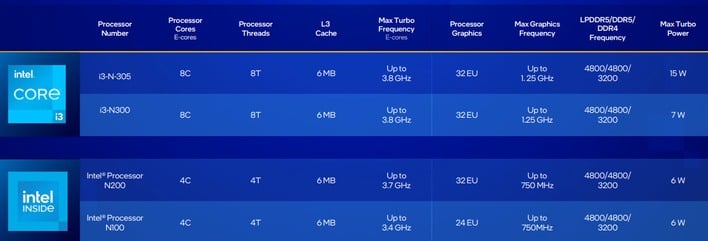
The Intel N100 boasts extremely low power consumption, typically around 6W TDP. This makes it highly energy-efficient, ideal for always-on systems, and contributes to quiet, often fanless, mini PC designs, saving on electricity bills over time.
Is the N100 a good long-term gaming investment
As a primary gaming investment for modern titles, no. As a secondary or dedicated cloud/retro gaming machine, it offers excellent long-term value due to its low cost and efficiency, providing an accessible entry point to various gaming experiences without constant upgrades.
Intel N100 excels in light casual and indie games. Not suitable for AAA titles or demanding esports. Ideal for budget-conscious gamers and mini PC setups. Offers excellent power efficiency. Best for older titles or cloud gaming.
35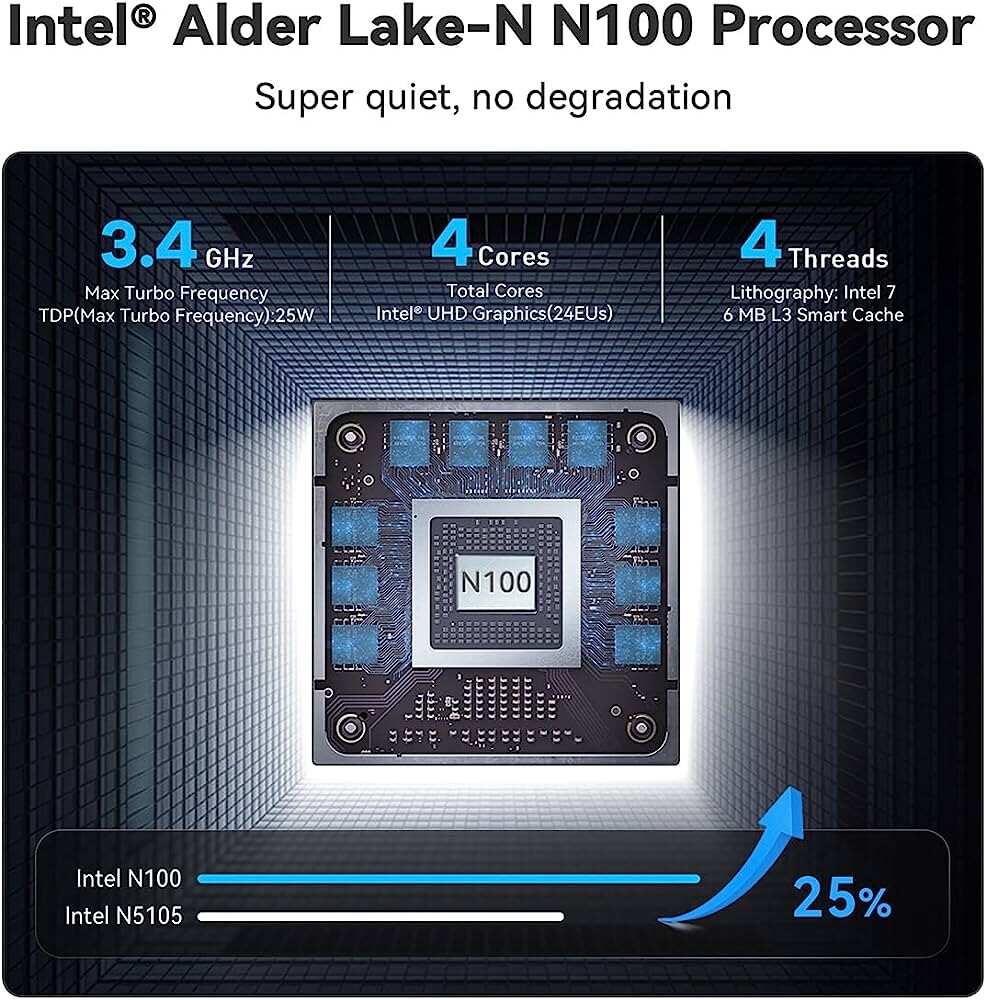


Intel N100 Quad E Core Gaming Performance Assessed TechPowerUp . Konsol Gim Video Pixel Haven Box MINI PC Retro Game Game Box Dengan . Snapklik Com NIAKUN Laptop Computer Gaming Laptops 2026 16 Inch Lap 81mkxdCrLHL . What Is The Intel N100 Processor And Is It Any Good Mini PC Reviewer Intel N100 Performance Overview A8qjm 930x575 . This New Pocket Sized PC Features An Intel N100 Alder Lake N CPU 96848 1501 This New Pocket Sized Pc Features An Intel N100 Alder Lake N Cpu Fanless Design


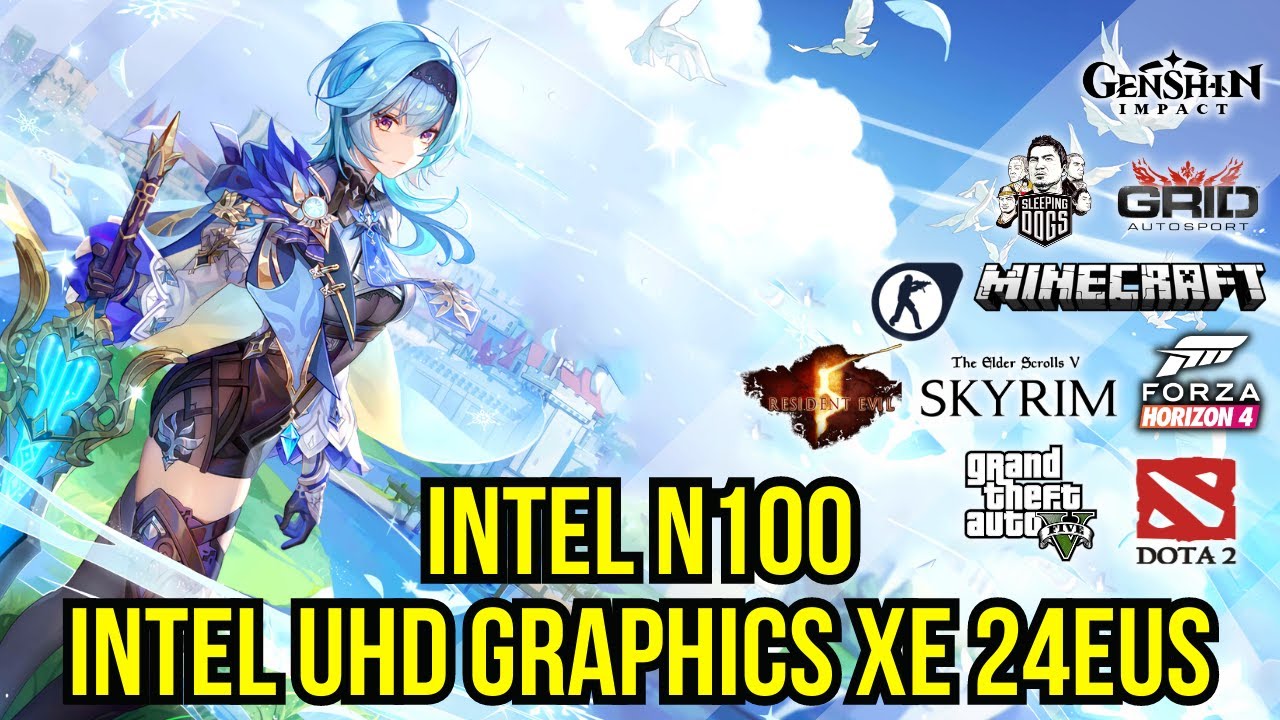

ROSA OFFICE N100 N100.webp. Intel N100 The Modern Day Celeron Gaming Experience YouTube . Intel N100 C Mo Rinde En GAMING Intel N100 . Intel Processor N100 Intel UHD Graphics Xe 24EUs 10 Games Gameplay . Intel N100 W UHD Graphics Or GeForce GTX 1650 Test In 15 Games At
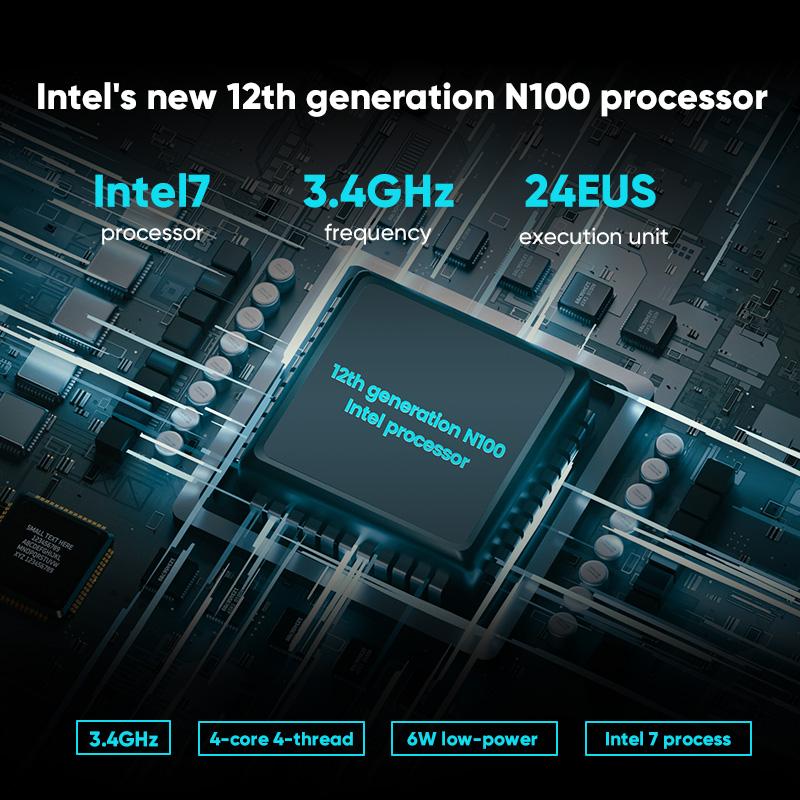
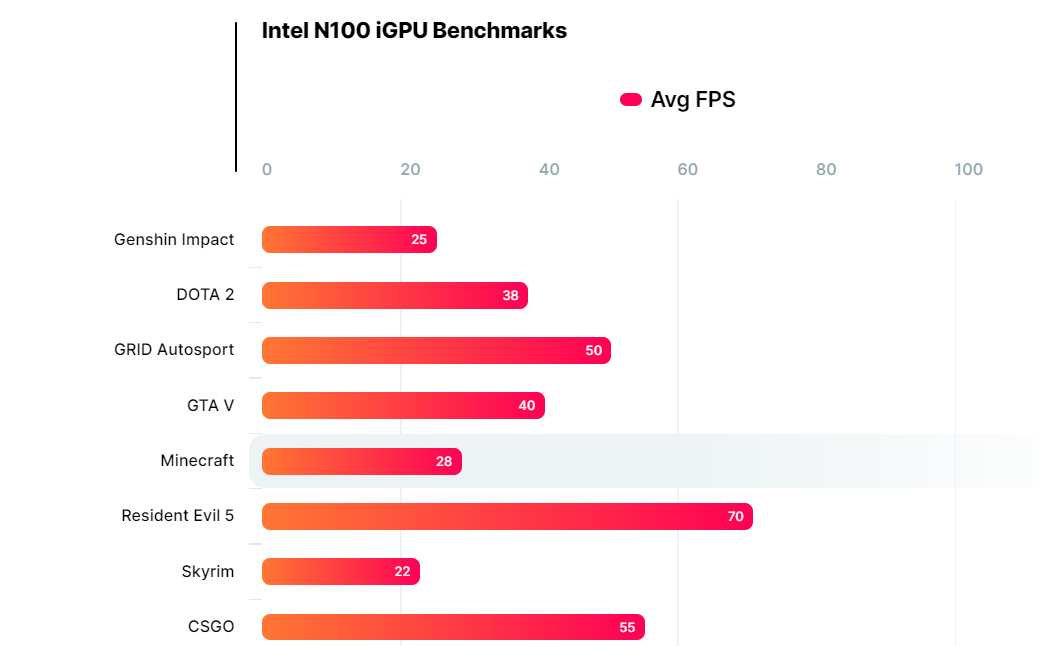
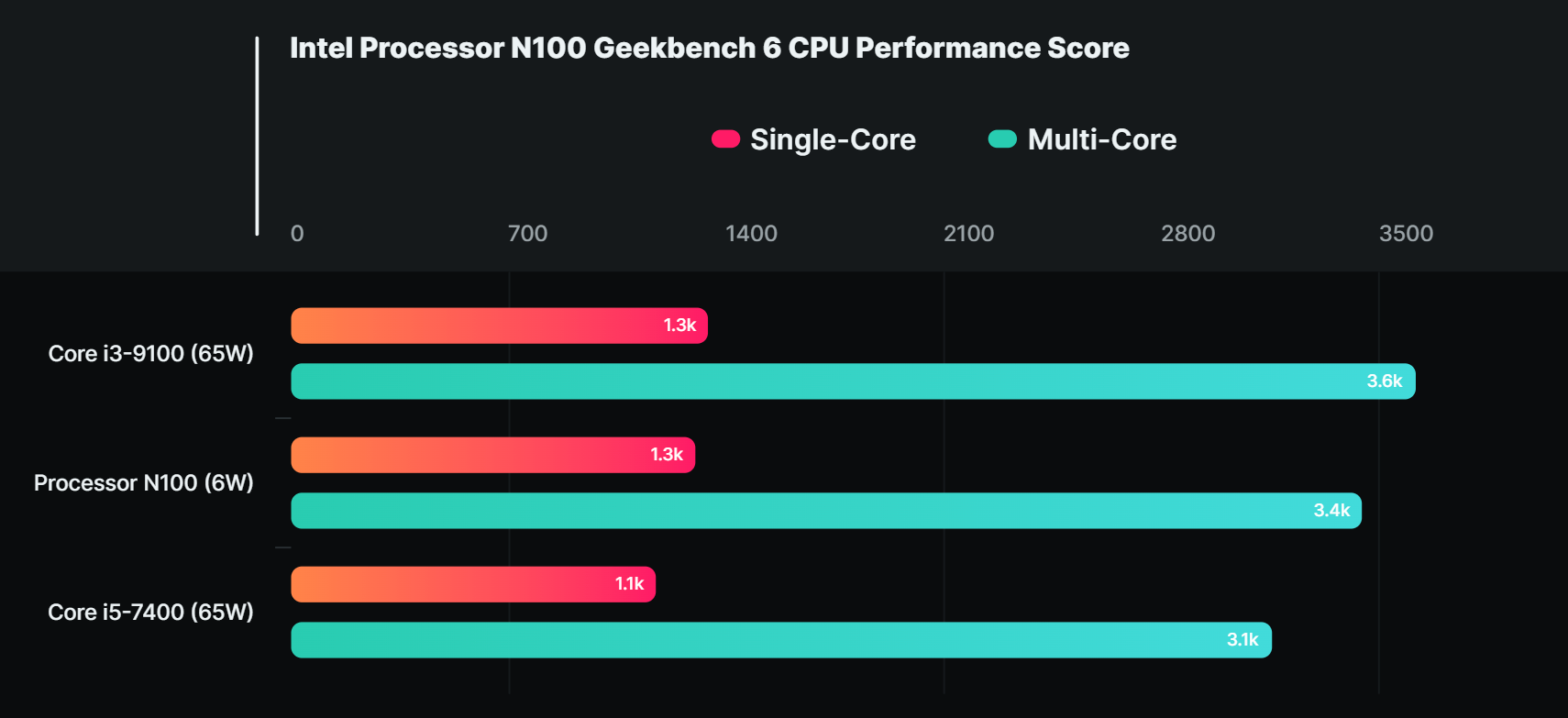

Procesador Intel N100 Rendimiento Aceptable En Juegos Procesador Intel N100 . Benchmark Game CPU Entry Level Intel N100 Terkuak Screenshot 17 . Intel S E Core Powered Processor N100 Is Over 10x More Efficient Than Screenshot 2023 06 26 042245 . Intel N100 Graphics In 10 Games Gameplay Test Intel UHD Xe 24EUs . Intel S All E Core N100 3 4GHz CPU Gets Benchmarked In GTA V And Other Small Intel Alder Lake N Series

NX N100 Compact Fanless PC Intel Alder Lake N Dual HDMI . Intel N100 Minipc Compact 4K Gaming . Intel N100 Intel UHD Graphics Xe 24EUs 10 MORE Games Tested YouTube . Intel S E Core Powered Processor N100 Is Over 10x More Efficient Than . Intel N100 V2 B


Mengenal Chipset Intel N100 CPU Hemat Daya Terbaik Di 2023 IDN Times . 7 Fakta Chipset Intel N100 Yang Menjadi CPU Paling Hemat Daya Dunia Games Optimize Image. Intel Processor N95 Vs N100 Intel UHD Graphics Xe Test Gaming 1703191202 . Intel E Core Only N100 Gaming Benchmarks Emerge Tom S Hardware . 12th Gen Mini Gaming Laptop Intel Alder Lake N100 8 Inch Touch Scre


Intel Processor N100 CPU Benchmarks And Specs Tech Csm Intel Alder Lake N Ablock Diagram Edf631640c . Intel E Core Only N100 Gaming Benchmarks Emerge Tom S Hardware . Is Intel N100 Processor Good INDUROCK 1 1 500x500 . Is Intel N100 Processor Good INDUROCK What Is A Panel Pc.webp. Is Intel N100 Processor Good INDUROCK 2 2 500x500



Is Intel N100 Processor Good INDUROCK Gms Rugged Device.webp. Super Console X MP100 Mini Retro Video Game Console Intel N100 8GDDR5 . Retro Game Console Raspberry Pi Products Open Source Handheld 01 1 . Snapklik Com NIAKUN Laptop Computer Gaming Laptops 2026 16 Inch Lap 71WZz15pVBL . Intel N100 Quad E Core CPU Gaming Benchmarks Surfaces Online 6W Chip N Series Image Custom 232x232