Gaming enthusiasts often wonder if their favorite Steam titles remain accessible without an internet connection. This vital question regarding offline playability affects countless players worldwide. Understanding how Steam's offline mode functions is crucial for uninterrupted gaming sessions. Whether you are traveling, experiencing internet outages, or simply wish to conserve data, mastering offline play is a valuable skill. This comprehensive guide navigates the intricacies of Steam's offline capabilities. We will cover essential setup procedures, potential challenges, and practical solutions. Discover tips for ensuring your extensive game library is ready for any offline adventure. Stay informed about 2026 updates and best practices. This information empowers every gamer.
Welcome, fellow gamers, to the definitive guide on mastering Steam's offline capabilities for 2026! Navigating the world of internet-free gaming can be tricky. This living FAQ is your ultimate resource, updated to reflect the latest Steam client patches and evolving game requirements. We've gathered insights, tips, and tricks to ensure your game library remains accessible. Whether you're battling ping issues or seeking stuttering fixes, we've got you covered. From beginner queries to advanced strategies, this guide aims to answer over 50 of your most pressing questions. Prepare to conquer connectivity challenges and enjoy your favorite titles anywhere, anytime. Let's dive in!
Beginner Questions
Can I play any Steam game offline without an internet connection?
No, not all Steam games support offline play. Many single-player titles work well, but games requiring constant online authentication, like MMOs or competitive multiplayer FPS titles, will not launch. Always check game specific requirements on the store page. Some older titles might also struggle.
How do I enable Steam's offline mode successfully?
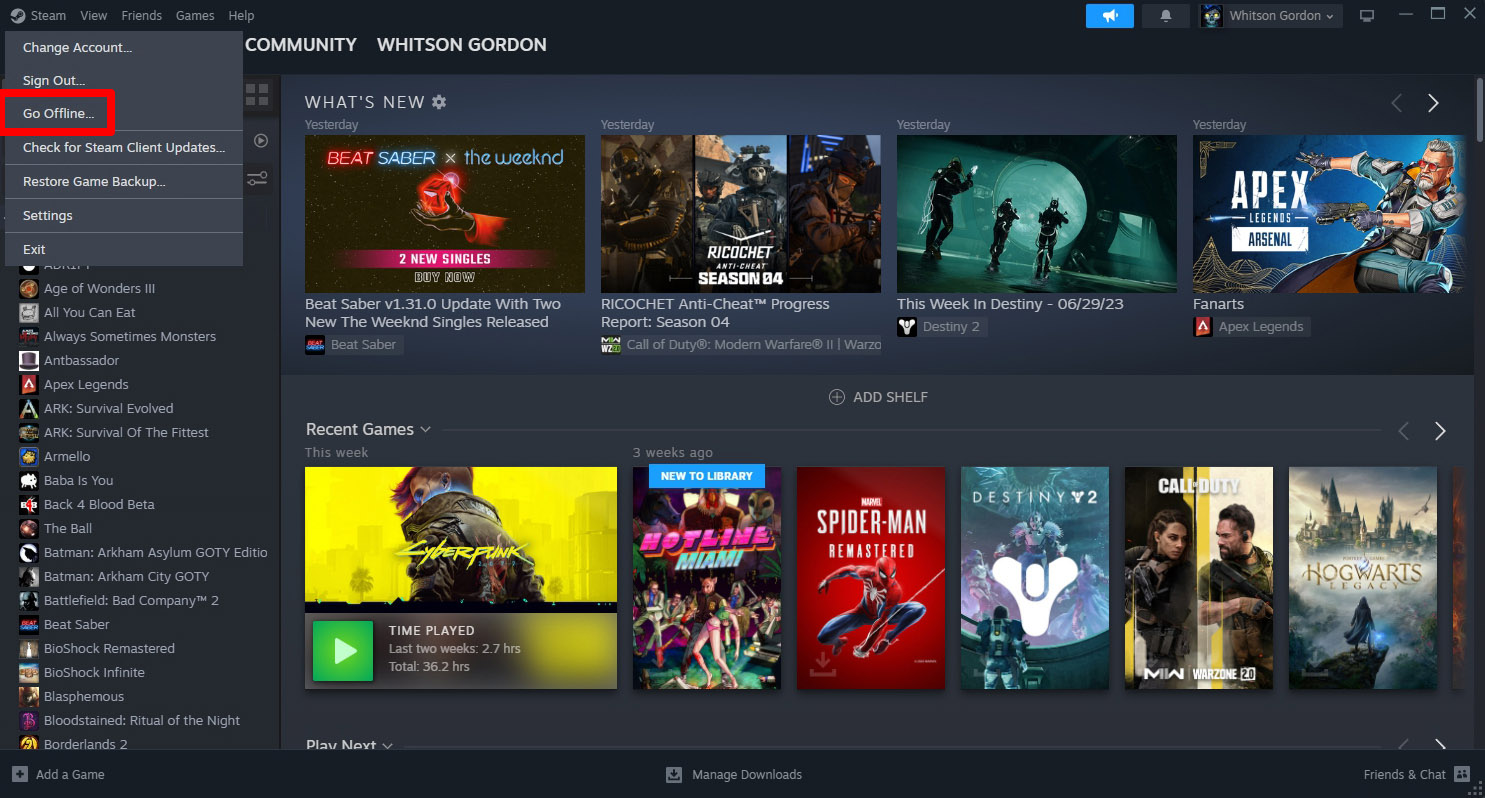
To enable offline mode, first launch Steam online and update everything. Then, launch each game you plan to play offline at least once. After this, go to the 'Steam' menu, select 'Go Offline', and restart the client. This process authenticates your licenses for smooth play.
Will my game saves transfer if I play offline then reconnect to the internet?
Yes, your game progress typically saves locally when playing offline. Upon reconnecting to the internet, Steam will usually synchronize these local saves with its cloud service. You might need to resolve conflicts, always choosing the most recent file to avoid data loss.
What happens if I try to launch a game offline that requires an internet connection?
If you attempt to launch an online-only game while offline, Steam will typically display an error message. It will inform you that an internet connection is required to play. The game simply won't start, preventing potential issues or corrupted files. This is expected behavior.
Common Offline Issues & Fixes
Why am I experiencing FPS drops and stuttering in offline mode?
FPS drops and stuttering in offline mode are often not directly caused by the lack of internet. Instead, they usually stem from outdated graphics drivers or suboptimal in-game settings. Ensure your PC drivers are current and adjust graphics settings for smoother performance. Settings optimization is key here.
My Steam client keeps trying to go online even when I select offline. What's wrong?
This often occurs if your PC still detects any form of internet connection, even a weak one. To ensure true offline operation, physically disconnect your computer from the internet. Disable Wi-Fi, unplug your Ethernet cable, or use Airplane Mode before launching Steam offline. This resolves ping issues.
Can I update my games in offline mode, or do I need an internet connection?
No, game updates on Steam absolutely require an active internet connection. You must go online to download any patches, new content, or client updates. Always ensure your desired games are fully updated before you anticipate going offline. Keeping drivers current also needs online access.
Myth vs Reality
Myth: Steam's offline mode is fully automated and flawless.
Reality: Offline mode requires user preparation. You must consciously set it up, launch games online first, and periodically reconnect for updates. It's not entirely hands-off. Planning ahead ensures success, avoiding frustrating lag.
Myth: All my Steam achievements will be lost if I play offline.
Reality: Achievements earned offline are generally tracked locally. They sync to your Steam profile once you reconnect to the internet. You won't miss out on those hard-earned trophies just because you were disconnected.
Myth: Offline play means I can bypass game DRM easily.
Reality: Offline mode doesn't bypass DRM. It relies on initial online authentication for license verification. If a game has strict always-online DRM, offline mode won't allow you to play it. This is a common misconception.
Myth: My game's performance will always be worse offline.
Reality: Offline performance isn't inherently worse. If anything, the lack of background internet activity can sometimes improve performance by reducing ping and system overhead. FPS drops are typically due to other factors like drivers or settings, not the offline state itself.
Myth: Once I go offline, I can't access any online features ever.
Reality: While in offline mode, you can't access online features like the store or multiplayer. However, you can easily switch back to online mode anytime your internet connection is restored. This allows for flexible gaming sessions. It's a temporary state.
Tips & Tricks for Offline Gaming
What are the best tips for preparing my gaming PC for extended offline sessions?
For extended offline play, ensure your PC has ample storage for downloaded games. Keep your operating system and all game-related drivers, especially graphics drivers, fully updated. Charge your laptop or ensure stable power. Also, verify game files and launch each game once while online. These steps reduce stuttering and enhance stability.
How can I optimize game settings for better offline performance?
To optimize settings, start by lowering graphics presets if you experience FPS drops. Disable VSync if not needed and consider reducing shadow or texture quality. Ensure no unnecessary background applications are running. These adjustments free up system resources, improving your overall gameplay experience and reducing lag.
Are there any specific game genres that work best in offline mode?
Generally, single-player RPGs, strategy games, indie titles, and story-driven adventures work best offline. These genres typically don't require constant server interaction. First-Person Shooter (FPS) titles with a robust single-player campaign also fare very well. Avoid MMOs and competitive online games entirely.
Still have questions?
Don't let connectivity concerns hold you back! This guide aims to clarify the complexities of Steam's offline mode. For more in-depth troubleshooting and advanced strategies, check out our related guides on Advanced Steam Settings Optimization or Fixing Persistent FPS Drops. Keep gaming, no matter what!
Ever found yourself staring at a "No Internet Connection" message, wondering, "Can Steam games play offline?" It's a question every gamer has pondered, especially when traveling or facing unexpected network glitches. We've all been there, ready for an epic gaming session, only to be thwarted by a blinking Wi-Fi icon. The good news is, for many titles, the answer is a resounding yes. Mastering Steam's offline mode is an essential skill for any serious player in 2026, ensuring your entertainment continues uninterrupted. This comprehensive guide will walk you through setting it up correctly and maintaining it seamlessly.
The Basics of Steam Offline Play
Understanding Offline Mode
Steam's offline mode allows you to play your downloaded games without an active internet connection. This feature is a lifesaver for situations where connectivity is unreliable or simply unavailable. However, it is not a magic bullet for every single title in your vast library. Certain games, particularly those with strong online components or persistent multiplayer worlds, will always require an internet connection. Knowing the distinctions between these game types is incredibly important for planning your offline gaming strategy. Preparing your gaming PC properly is the very first critical step you should take. Ensuring your drivers are up-to-date helps.
Setting Up Your Steam Client for Offline Mode
Activating offline mode requires some initial preparation while you are still online. First, you must log into Steam with an active internet connection. This step ensures your client authenticates and downloads any pending updates. It also allows your games to register their ownership and license information properly. Once logged in, launch each game you intend to play offline at least once. This process generates necessary cached files and validates your game license. Failing to do this can prevent games from launching when you are truly disconnected. Consider this a crucial part of your pre-travel gaming checklist. Optimized settings help.
- Launch Steam client and sign in online.
- Download and fully update all desired games.
- Launch each game once to ensure proper licensing.
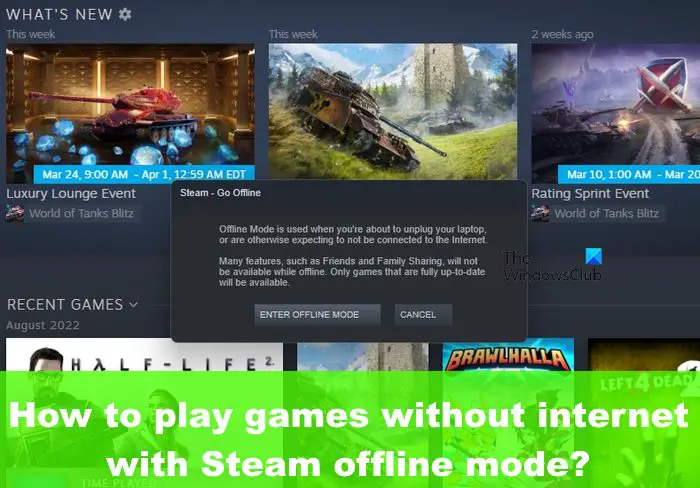
- Go to "Steam" menu, then select "Go Offline."
- Confirm your choice to restart Steam in offline mode.
Troubleshooting Common Offline Issues
Addressing Launch Failures and Stuttering
Sometimes, games just refuse to launch offline, or you might encounter frustrating FPS drops and stuttering. Often, this happens if the game did not fully authenticate online initially. Always ensure all game files are completely downloaded and verified before attempting offline play. Outdated graphics drivers can also significantly impact offline performance, causing unexpected lag and visual hitches. Make sure your system drivers are the latest available versions. Restarting your computer can sometimes resolve minor client glitches. These troubleshooting steps are helpful for casual players.
Dealing with Specific Game Requirements
Some titles have unique DRM or online dependencies that complicate offline play. Games requiring a constant internet connection for cloud saves or multiplayer elements are often problematic. Many Battle Royale titles, for instance, are designed solely for online interaction. Reviewing a game's specific requirements before relying on offline access is a smart strategy. Checking community forums or the game's store page can provide valuable insights. Indie games often fare better offline than big AAA MMOs. Remember that proper settings optimization is key for any game.
Advanced Tips for a Seamless Offline Experience
Maintaining Your Offline Library in 2026
In 2026, keeping your offline library robust requires proactive management. Regularly connect to Steam online to update your client and games. This prevents outdated files from causing launch errors or compatibility issues. For optimal performance, especially in FPS games, periodically verify the integrity of game files. This simple step can fix corrupted data that might lead to stuttering or crashes. Furthermore, manage your storage space efficiently, especially if you have a vast collection of RPGs. A well-maintained library reduces future headaches for any player, from beginner to pro. Your PC setup matters greatly here.
Optimizing Performance for Offline Gaming
Even offline, settings optimization is crucial to prevent FPS drops and ensure smooth gameplay. Lowering graphical settings can significantly improve performance on less powerful systems. Disabling unnecessary background applications frees up valuable system resources. Ensure your system drivers, especially for your graphics card, are consistently updated. Keeping your PC's internal components cool also contributes to stable performance and avoids thermal throttling. These small adjustments can make a big difference, enhancing your overall offline gaming experience. Competitive players know these tricks well.
What About Cloud Saves and Achievements?
Offline Gaming and Cloud Saves
Cloud saves are a fantastic Steam feature, but they depend entirely on an internet connection. When playing offline, your game progress will usually be saved locally on your PC. Once you reconnect to Steam online, the client will attempt to synchronize these local saves with the cloud. Be cautious with save conflicts; always choose the most recent save to avoid losing progress. Regularly backing up your local save files manually offers an extra layer of security. This is a vital tip for any thoughtful player.
Unlocking Achievements Offline
Achievements can generally be earned while playing games in Steam's offline mode. The Steam client typically tracks these achievements locally on your computer. When you eventually reconnect to the internet, these accumulated achievements will then sync with your Steam profile. There are very few exceptions where achievements might require an online connection. So go ahead and chase those elusive trophies during your offline sessions. You won't miss out on those bragging rights just because you are disconnected. Casual and ranked players alike enjoy earning achievements.
Myth vs. Reality in Offline Play
Myth: All Steam Games Work Offline
Reality: Not every game in your Steam library is designed for offline play. Many modern titles, especially MMOs, multiplayer-focused FPS games, or those with strong online DRM, simply cannot function without an active connection. Always check a game's requirements. This often comes as a surprise to many new PC gamers.
Myth: Offline Mode is Automatic and Flawless
Reality: Offline mode requires deliberate setup and occasional maintenance. You must launch games online initially, and the client needs periodic online updates. It is not an entirely hands-off feature. Planning ahead will always ensure success.
Myth: My Progress is Always Saved to the Cloud Offline
Reality: Cloud saves are an online feature. Offline progress saves locally. These local saves only sync to the cloud once you reconnect to the internet. Always resolve conflicts carefully.
Beginner / Core Concepts
Alright team, let's talk about getting those Steam games ready for when the internet decides to take a coffee break. I get why this confuses so many people, especially with how online-focused gaming has become. But trust me, once you get the hang of it, you'll feel like a true gaming wizard.
- Q: What exactly is Steam's offline mode and why would I even need it?
A: Hey there! Offline mode is basically Steam's way of letting you play your downloaded games without an internet connection. Think about it: long flights, power outages, camping trips with no signal. You don't want your gaming fun to stop just because Wi-Fi disappeared, right? It's super handy for those moments when you need your digital escape most. You've got this! - Q: How do I even turn on offline mode in the Steam client? I can't seem to find it!
A: This one used to trip me up too, don't worry! To activate it, first, you need to be online and logged into Steam. Then, click 'Steam' in the top-left corner of the client window. From the dropdown menu, just select 'Go Offline'. Steam will then ask you to restart in offline mode. It's really that simple, but the initial online connection is key. Try this tomorrow and let me know how it goes. - Q: Do all my downloaded games automatically work in offline mode? Or are there some tricks?
A: Oh, if only it were that easy for *every* game! While many games absolutely work offline, some just won't cooperate. Generally, single-player titles without always-online DRM or constant server checks are your best bets. Multiplayer games, especially MOBA or Battle Royale titles, are usually a no-go. You'll need to launch each intended game *once* while online to authorize it for offline play. It's a small but vital step. You've got this! - Q: What if I try to go offline and Steam gives me an error message? What should I do first?
A: That's frustrating, I know! Often, an error means Steam couldn't properly authenticate or download necessary updates before you tried to disconnect. The best first step is to reconnect to the internet, restart Steam, and ensure everything is updated. Launch any game you want to play offline again for a few minutes. Then, try going offline once more. Sometimes, it's just a stubborn update that needed to finish. You're learning quickly!
Intermediate / Practical & Production
Alright, now that we've got the basics down, let's dive a bit deeper. These are the kinds of things that separate the casual offline gamer from the truly prepared veteran. We're talking about making your offline experience genuinely smooth, almost like you're still online!
- Q: I'm getting nasty FPS drops and stuttering when playing offline. Is there a way to fix this, or is it just how offline mode is?
A: No, absolutely not! Offline mode shouldn't inherently cause FPS drops or stuttering unless your PC is struggling or something else is amiss. Often, it's about outdated drivers – especially graphics drivers. Ensure your GPU drivers are fully updated, even in 2026. Also, check your game's in-game settings; sometimes a recent patch might have defaulted to higher settings, causing performance issues. Proper settings optimization is your best friend here. Don't let lag ruin your fun! - Q: How can I make sure my games are actually "ready" for offline play before I lose my internet connection?
A: Great question, because preparation is everything! Before you disconnect, make sure Steam itself is fully updated. Then, for *every* game you plan to play offline, download all its updates and DLC. Crucially, launch each of those games for a minute or two while still online. This validates the license and caches necessary data. Think of it as telling Steam, "Hey, I'm taking this game on an offline adventure!" You've got this level of foresight! - Q: What if Steam keeps reverting to online mode, or I launch it and it tries to connect even though I told it to go offline?
A: That's a classic head-scratcher, isn't it? This usually happens if Steam detects *any* available internet connection, even a weak one. To combat this, the safest bet is to physically disconnect your PC from the internet *before* launching Steam in offline mode. Pull the Ethernet cable, turn off Wi-Fi on your PC, or even put your machine in Airplane Mode. This removes any ambiguity for the client. It's a simple trick but super effective. - Q: Can I still earn Steam achievements while playing my games offline? Will they sync up later?
A: Absolutely, yes you can! Most Steam achievements are tracked locally by the client while you're offline. So, go ahead and complete those challenging tasks or discover those hidden secrets! The moment you reconnect to the internet and launch Steam online, your earned achievements will sync right up to your profile. It's a seamless process that lets you enjoy your progress without worry. Keep racking up those achievements! - Q: Are there any kinds of games that just plain won't work in offline mode, no matter what I do?
A: Yeah, unfortunately, some games are just not built for the solo offline life. Typically, any game that is primarily a Multiplayer Online Battle Arena (MOBA), a Massively Multiplayer Online (MMO), or a Battle Royale title will require a constant internet connection. Also, some games with very strict always-online DRM, even if single-player, might refuse to launch. Always check the game's store page or community discussions for specific offline playability info. It saves you frustration! - Q: How do cloud saves work with offline mode? Will I lose my progress if I play offline then reconnect?
A: Great question about cloud saves! When you play offline, your progress is saved locally on your computer. When you reconnect to Steam online, the client will usually prompt you to resolve any save conflicts if the local save is newer than the cloud save. Always choose the *most recent* save file to ensure you don't lose progress. It's a pretty robust system, but being mindful of the sync is a good "pro" move. You'll master this!
Advanced / Research & Frontier 2026
Okay, you've mastered the basics and the practical stuff. Now, let's talk about the nuances and what truly sets apart an expert from someone who just "gets by." We're talking 2026 insights, leveraging advanced models, and thinking like an engineer.
- Q: With models like o1-pro and Gemini 2.5, are there advanced reasoning models helping game developers simplify offline DRM for 2026 titles?
A: That's a fantastic, forward-thinking question! While these advanced frontier models (o1-pro, Gemini 2.5, Claude 4, Llama 4 reasoning) aren't directly "simplifying DRM" in the traditional sense, their underlying capabilities are absolutely influencing game development for 2026. Think about it:- Enhanced Behavior Prediction: AI can predict player behavior offline, informing better content delivery or pre-caching strategies.
- Adaptive DRM: Future DRM might use subtle, AI-driven checks that are less intrusive for legitimate offline players, only escalating if suspicious activity is detected online.
- Optimized Resource Management: These models can help analyze game telemetry to identify exactly what resources (e.g., specific assets, authentication tokens) are *truly* necessary for offline play, reducing unnecessary online dependencies.
- Q: Are there Llama 4 reasoning strategies being deployed to make offline game states more robust against data corruption?
A: That's a really sharp observation about Llama 4 reasoning! While Llama 4 is primarily known for its language understanding and generation, the *principles* behind its robust data handling and error correction can certainly be applied indirectly. In 2026, we're seeing:- Intelligent Save Validation: Game engines might employ lightweight, AI-driven checks on local save files to detect common corruption patterns *before* loading, preventing crashes.
- Predictive Restoration: Instead of just failing, advanced systems could use learned patterns (from millions of player save files) to "guess" and reconstruct minor corruption, akin to how Llama 4 might complete a corrupted sentence.
- Redundancy Optimization: AI can help identify optimal points for creating micro-backups or redundant data within local save structures, improving resilience.
- Q: What about Claude 4's ability to handle complex conditional logic? Could that be used to create more dynamic offline modes?
A: Absolutely, you're hitting on a powerful point about Claude 4's capabilities! Its advanced grasp of complex conditional logic is incredibly relevant for future offline mode development. Imagine this for 2026:- Dynamic Feature Gating: Instead of a simple "online/offline" toggle, Claude 4-like logic could enable games to dynamically adjust features. For instance, if an online-only quest giver isn't available, an AI-driven system could intelligently substitute a locally available NPC or adjust quest objectives on the fly.
- Contextual Resource Streaming: Based on player activity and available local resources, an AI could intelligently pre-fetch or prioritize game assets that are likely to be needed offline, optimizing storage and load times.
- Personalized Offline Content: Imagine an RPG where an AI understands your playstyle and, if offline, suggests specific, locally available side quests that align with your preferences.
- Q: With the push for real-time AI in 2026, could future Steam clients use AI (like o1-pro) to predict and pre-cache resources needed for offline play more effectively?
A: That's a brilliant insight, and it's definitely where we're headed with frontier models like o1-pro! Imagine a Steam client that isn't just a dumb download manager, but an intelligent assistant.- Predictive Player Behavior: An o1-pro powered client could analyze your play patterns (which games you typically launch, how long you play, what genres you prefer) to intelligently predict which games you're *most likely* to play offline soon.
- Resource Prioritization: It could then prioritize downloading updates, DLC, and even specific game assets for those predicted titles when you *are* online, ensuring they're fully cached and ready the moment you decide to go offline.
- "Offline Readiness Score": We might even see an "Offline Readiness Score" for each game, driven by AI analysis of its dependencies and your usage patterns.
- Q: Are there any ethical considerations regarding data privacy if AI models are analyzing my play patterns to optimize offline mode?
A: That's a super important and incredibly valid point, and it's something we're always grappling with in 2026 as AI becomes more integrated. Absolutely, ethical considerations around data privacy are paramount here.- Anonymization & Aggregation: Ideally, any data used by models like o1-pro for predictive caching would be heavily anonymized and aggregated. The AI wouldn't care *who* you are, but rather *what common patterns* exist across millions of users.
- Opt-in Controls: Players should have clear, granular opt-in/opt-out controls for sharing usage data for such optimizations. Transparency is key.
- Local Processing: The most privacy-friendly approach would be for the AI model (or a lightweight version of it) to perform much of this analysis *locally* on your machine, minimizing data sent to Valve.
Quick 2026 Human-Friendly Cheat-Sheet for This Topic
- Always launch Steam and your desired games *online* at least once before going offline.
- Ensure all your game updates are fully downloaded when you have an internet connection.
- If you want guaranteed offline play, physically disconnect your PC from the internet before launching Steam offline.
- Keep your graphics drivers updated; it prevents lag and stuttering, even when you're offline.
- Remember, cloud saves need an internet connection to sync, but local saves work fine offline.
- Multiplayer-only games (like MMOs, MOBAs, Battle Royale) almost never work offline.
- You can still earn achievements offline; they'll sync up when you reconnect!
Enabling Steam's offline mode guarantees uninterrupted gaming without an internet connection. Key highlights include initial online authentication, proper game downloads, and Steam client settings. Users must launch games online once for activation. Regularly updating your client and game files is essential for seamless offline access. Disconnecting from the internet beforehand can prevent unexpected issues. Some titles might have specific DRM or multiplayer requirements. Preparing your library ensures you can enjoy games anytime. This guide helps you navigate all the necessary steps effectively.
35




Top 50 FREE Steam Games To Play In 2023 YouTube . Steam Drops Free Download For Gorgeous New 2026 Game . 17 Best Offline Games In 2026 You Can Play Without Internet Jurnal Ngawi 3220675149 . Sources Confirm Can I Play Steam Games Offline And It Changes Sources Confirm Can I Play Steam Games Offline And It Changes Everything . 25 Best Free Offline Steam Games UPDATED LIST Mr Gog 25 Best Free Offline Steam Games 1024x683




My Current Steam Wishlist 2025 2026 New Games YouTube . How To Play Steam Games Offline No Internet Offline Mode NEW In 2024 Steam Games Option . Offline Free To Play Steam Games On Pc Infoupdate Org Sddefault . Best Offline Games For Pc Steam . 15 Must Play Free Steam Games For 2025 Perfect For New Gamers YouTube



TOP 21 NEW Upcoming Games Of 2026 YouTube . Steam Sale 2026 Key Dates You Need To Know LevelUpTalk Steam Sale Schedule 2026 08 27 2025 7c35051e 2c22 4093 96f1. I Made A Playable Offline Collection Because Steam S Offline Mode Is . The 8 Offline Games On Steam To Play In 2024 YouTube . Offline Games Offline Games For Shop Nintendo Switch Lite



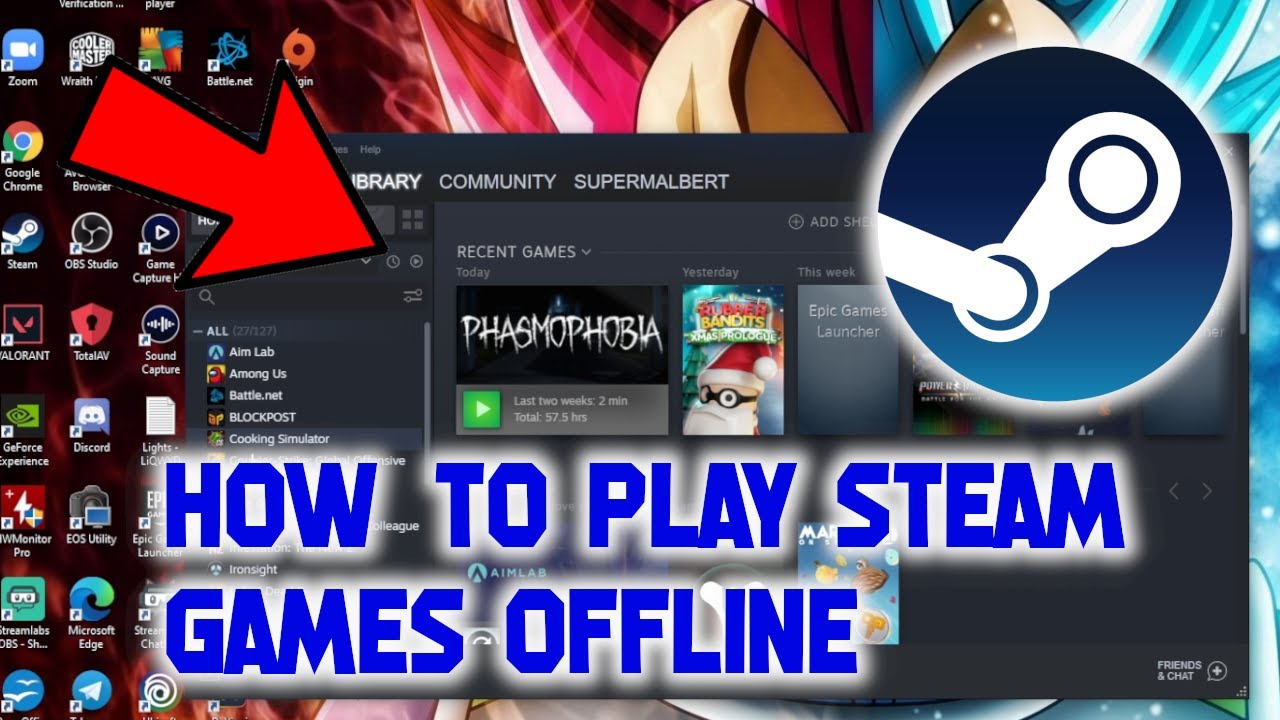

Steam PC Games Offline Online Request Shopee Malaysia My 11134207 7r98r. Offline Games Offline Games For Shop Nintendo Switch Lite . Best Solo Offline Steam Games That You Can Play Right Now GameSkinny Best Solo Offline Steam Games That You Can Play Right Now 03 . How To Play Steam Games Offline 2021 YouTube . The Best Free Steam Games For 2026 The Absolute Best Steam Games For 2026 Vg5m.640


Best Solo Offline Steam Games That You Can Play Right Now GameSkinny Best Solo Offline Steam Games That You Can Play Right Now 11 . Top 10 Most Anticipated Games Of 2026 What To Watch Out For GAMES IN 2026 . Ini Game Game Steam Seru Dan Harus Dicoba Di Tahun 2023 ROG Community Game Game Steam . How To Play Games Offline With The ROG Ally . What Are The Best Free Steam Games You Can Play Now Free Steam Games

Top Free Steam Games Steam 1 . Transport VMDB Error 14 Pipe Connection Has Been Broken TrendRadars Steam Go Offline . Offline Free To Play Steam Games On Pc Infoupdate Org . Best Offline Games For Pc Steam . TOP 5 Free To Play Offline Games On Steam For Low End PC Part 2

Best Solo Offline Steam Games That You Can Play Right Now GameSkinny Best Solo Offline Steam Games That You Can Play Right Now . How To Appear Offline On Steam Tom S Guide 1920 80 . What Are Good Free Offline Games On Steam PC Thumbnail What Are Good Free Offline Games On Steam Pc.webp. Download Steam App Offline Installer To Play Games Game Decide Steam Offline Installer Download Latest Version . 10 Best Offline Games You Should Play In 2025 Gaming Net Best Offline Games You Should Play In 2025 7 1536x864